
Welcome to our roundup of the best router tables for home woodworking in 2025!
Whether you’re a seasoned woodworker or just starting out, having the right router table is essential for achieving precise and repeatable cuts without cluttering your workshop. This guide is designed for DIY enthusiasts who want to simplify their routing tasks and enhance their project outcomes.
The router tables we’ve selected cater to a variety of needs, offering options from portable benchtop models to full-sized setups and even versatile drill-press alternatives. Each of these tables addresses common woodworking challenges, such as ensuring fence accuracy, efficient dust collection, and compatibility with different motor types.
By understanding these key features, you can find a router table that aligns with your specific projects and skill level.
As you explore the options available, consider factors like your workspace size, budget constraints, and the quality of cuts you aim to achieve. With our curated list, you’re sure to find a router table that fits seamlessly into your workflow and helps you elevate your woodworking skills.
Ready to dive into our top picks? Keep scrolling to discover the best router tables that will transform your woodworking experience!
SKIL RT1323-01 Router Table and 10Amp Fixed Base Router Kit
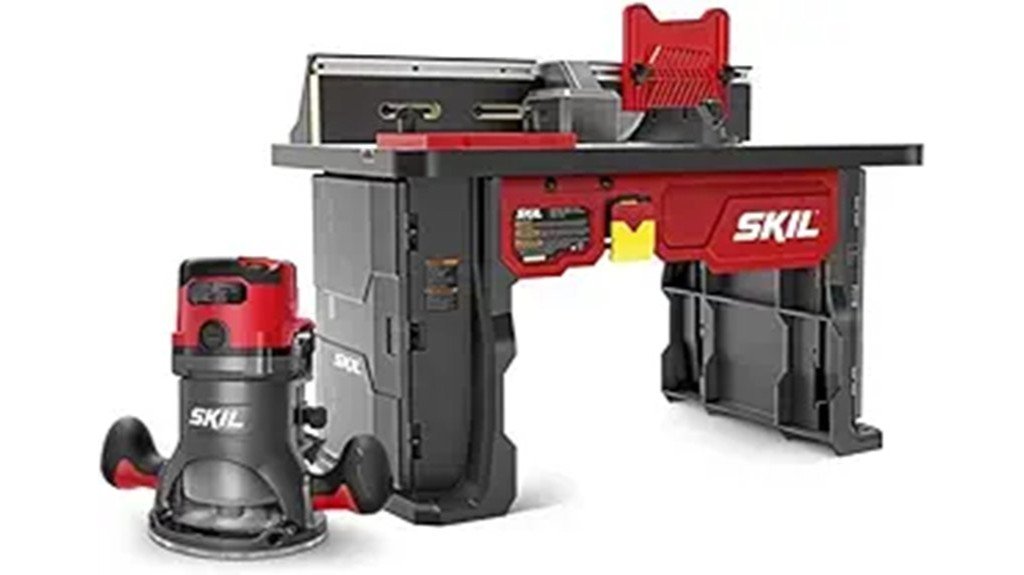
If you’re setting up a home workshop and want a router table kit that balances power and user-friendly features, the SKIL RT1323-01 is a strong choice—especially for beginners and intermediate woodworkers who need reliable performance without a steep learning curve. You’ll get a 10 Amp, 2.0 HP router with soft-start and six-speed control, plus a spacious 24-inch fence and above-table height adjustment for precise setups. The kit includes useful accessories like featherboards, inserts, and dust adaptor, and accepts 1/2″ and 1/4″ bits. Users praise power and value, though fence alignment and bit changes may need patience.
Best For: Beginners and intermediate woodworkers who want a powerful, user-friendly router table kit with good value and useful accessories.
Pros:
- 10 Amp, 2.0 HP motor with soft-start and 6-speed control delivers strong, smooth performance for a variety of materials.
- Comes with a 24″ adjustable fence, above-table height adjustment, integrated bit storage, and helpful accessories (featherboards, inserts, dust adaptor).
- Accepts both 1/2″ and 1/4″ shank bits and includes dust collection port for cleaner workspaces.
Cons:
- Some users report fence alignment can be finicky and may require careful setup.
- Changing bits can be awkward compared with dedicated plunge or quick-change systems.
- Assembly and precise height alignment require patience to achieve optimal accuracy.
Bosch RA1141 Portable Benchtop Router Table
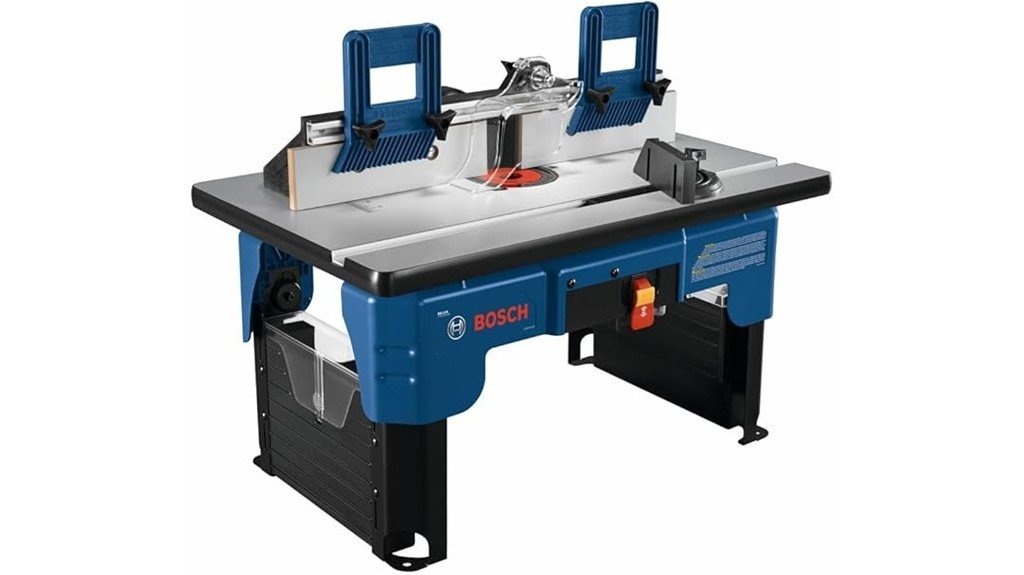
The Bosch RA1141 Portable Benchtop Router Table suits hobbyists and small-shop woodworkers who need a compact, ready-to-use workstation that’s easy to store and transport. You get an ultra-portable unit with folding legs, preassembled laminated MDF top, Easy Click router mounting for quick bit changes, and onboard storage for bits and parts. A tall fence, adjustable featherboards, starter pin, guard, and bit-height gauge improve control and setup. However, customers report warped tops, leveling and plate-fit issues, confusing markings, weak dust collection, and poor support; weigh convenience against these reliability and service concerns before buying.
Best For: Hobbyist and small-shop woodworkers who need a compact, portable, ready-to-use router workstation that’s easy to store and transport.
Pros:
- Ultra-portable, preassembled design with folding legs and onboard bit storage for quick setup and transport.
- Easy Click router mounting and bit-height gauge simplify bit changes and setup without leveling.
- Includes tall fence, adjustable featherboards, starter pin, and guard for improved control on many routing tasks.
Cons:
- Reports of warped laminated MDF top, loose router-plate fit, and confusing height markings that hinder precision.
- Dust collection is ineffective and featherboard/guard mounting can be inconvenient.
- Customer service and replacement/return experiences are frequently criticized.
JET 12-Inch Benchtop Drill Press (JWDP-12)
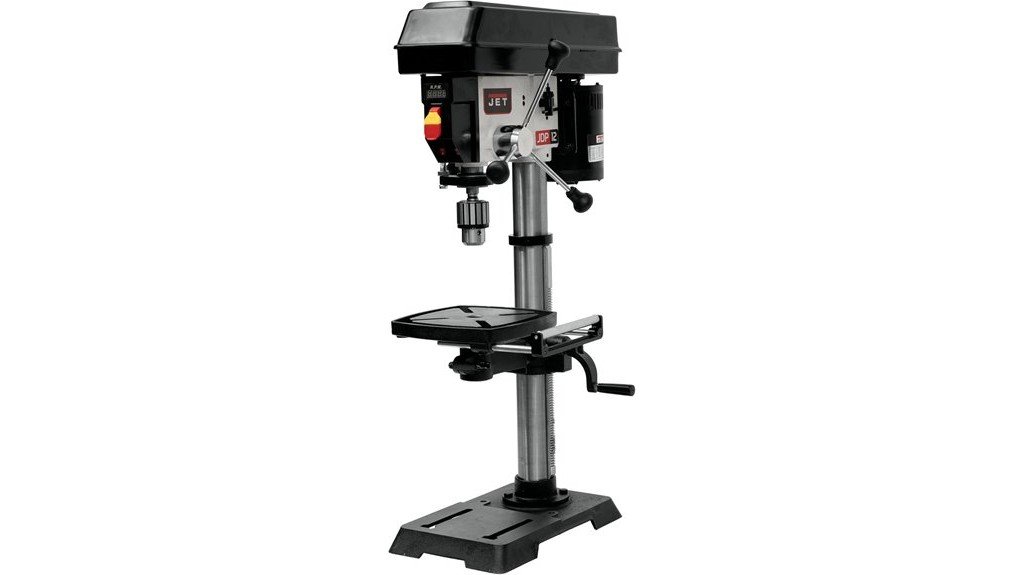
For hobbyists and small-shop woodworkers who need a compact, reliable drill press, the JET 12-Inch Benchtop Drill Press (JWDP-12) stands out with its variable-speed system and sturdy cast-iron base, giving you precise control from 530 to 3,100 RPM while keeping the unit steady during repetitive tasks. You’ll appreciate the 1/2 HP motor, 16-speed range, LED work light, retractable roller extension, and XACTA laser for alignment, and the clear depth scale helps repeatable holes. At 85 pounds it’s stable but needs two people to assemble. Some users note quill locking and power limits with large bits; warranty covers five years.
Best For: Hobbyists and small-shop woodworkers needing a compact, precise benchtop drill press for repetitive drilling and light-to-moderate projects.
Pros:
- Variable-speed range (530–3,100 RPM) with 16 speeds for accurate control across materials.
- Sturdy cast-iron base and 85 lb weight provide good stability; includes XACTA laser and LED work light for improved accuracy and visibility.
- Clear depth scale, retractable roller extension, and 5-year warranty (2 years commercial) add usability and confidence.
Cons:
- 1/2 HP motor can struggle with large-diameter bits or heavy-duty metal work.
- Some users report difficulty locking the quill and challenges with speed adjustments.
- Table lacks sufficient holes for securing larger fixtures, limiting versatility for some setups.
Bosch RA1181 Benchtop Router Table
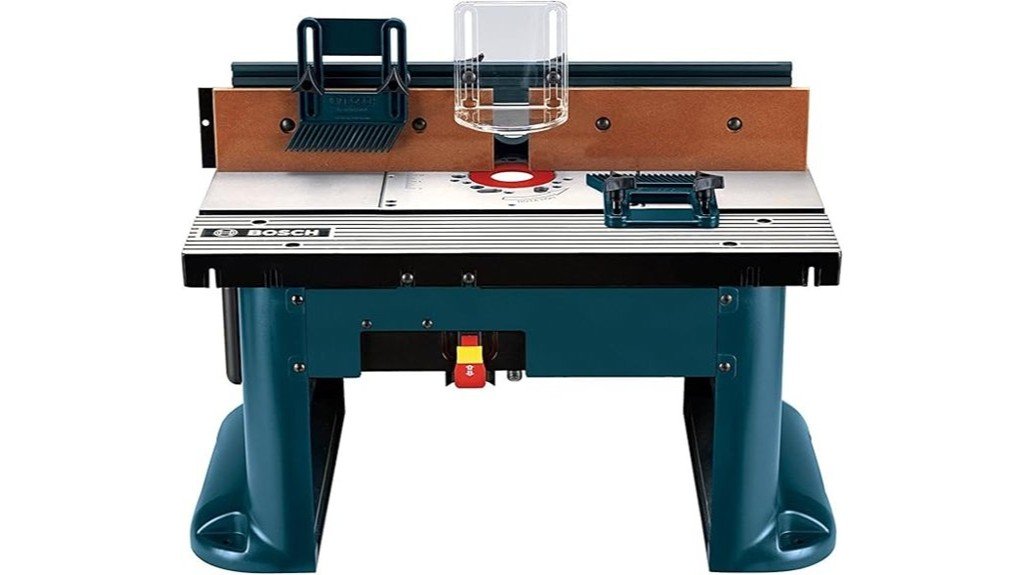
Serious hobbyists who value a large, rigid work surface will appreciate the Bosch RA1181 Benchtop Router Table, which pairs an extended aluminum top with a pre-drilled, height-adjustable aluminum mounting plate to support heavier routers and longer stock. You’ll get a tall aluminum fence with adjustable faceplates, featherboards, a 2½-inch dust port, accessory slot, and storage pocket, plus mounting hardware and guards. Weighing 30 pounds and backed by a one-year warranty, it scores well overall, yet many users report warped tabletops, plate gaps, awkward fence clearance, and poor support from Bosch. Consider testing fit thoroughly or exploring alternatives before committing.
Best For: Serious hobbyist woodworkers who want a large, rigid benchtop router table with a pre-drilled aluminum mounting plate and built-in dust collection, but who are willing to inspect for fit and finish or modify as needed.
Pros:
- Large aluminum top and rigid pre-drilled mounting plate provide extended work area and support for heavier routers.
- Tall aluminum fence with adjustable faceplates, featherboards, and 2½-inch dust port add versatility and cleaner operation.
- Includes useful accessories (mounting hardware, starter pin, guard, outfeed shims, storage pocket) and a compact 30 lb portable design.
Cons:
- Quality control issues reported (warped tabletop, gaps around router plate) that complicate leveling and stability.
- Design and fit problems (limited fence clearance, difficult plate removal, awkward featherboard/guard) make some tasks cumbersome.
- Mixed customer service experiences and only a 1-year limited warranty; some users returned via retailer due to inadequate support.
Kreg PRS2100 Bench Top Router Table (Full Size Portable)
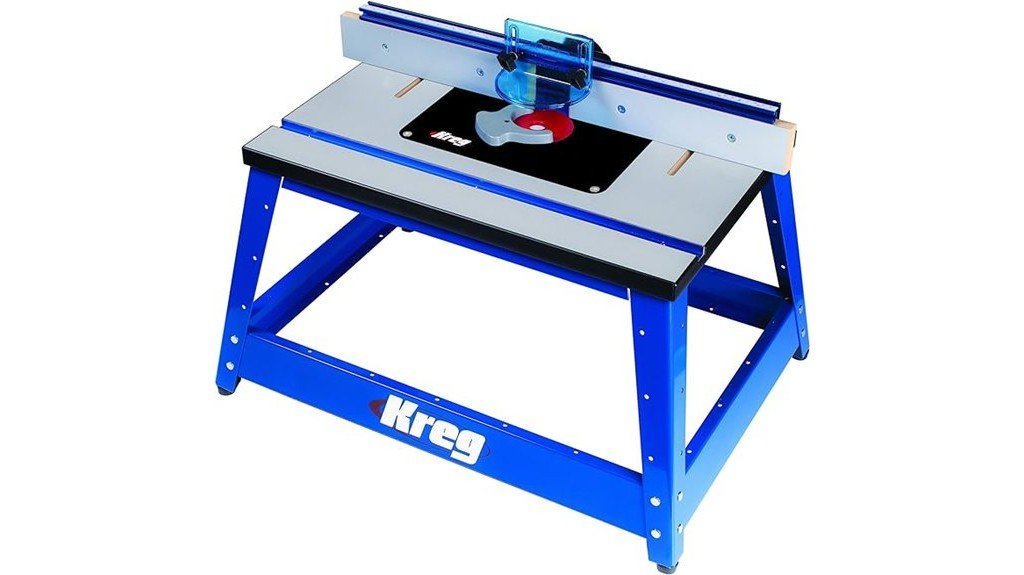
If you want a portable router table that balances shop-grade features with easy transport, the Kreg PRS2100 is a strong candidate, especially for woodworkers who do a mix of benchwork and occasional job-site tasks. You get a full-size, 30-inch MDF top on an aluminum frame that supports up to 200 pounds, with a low-friction micro-dot surface and level-loc insert rings for accurate setups. The sliding fence with jointing capability and dust port make precision work efficient, and casters ease movement. Expect clear but involved assembly, occasional reports of fragile fence hardware, and extra costs for accessories.
Best For: Woodworkers who need a full-size, portable router table that combines shop-grade features (jointing fence, level-loc insert rings) with easy transport for bench work and occasional job-site use.
Pros:
- Sturdy aluminum frame with a 30″ MDF top and 200 lb load capacity for stable, shop-quality performance.
- Sliding fence with jointing capability and level-loc insert rings enable accurate, repeatable cuts.
- Low-friction micro-dot surface, dust port, and casters improve ease of use, cleanliness, and portability.
Cons:
- Assembly can be time-consuming and somewhat involved, requiring careful attention to instructions.
- Some users report fragile fence attachment hardware that may need aftermarket reinforcement or modification.
- Price is relatively high for a portable table and additional accessories (switches, featherboards) are often needed and sold separately.
Factors to Consider When Choosing Router Tables for Home Woodworking
When you pick a router table for home woodworking, focus first on tabletop flatness and stability because a true surface keeps cuts accurate and repeatable. You’ll also want a fence that’s adjustable and square, sufficient motor power with variable speeds for different bits, and effective dust collection to keep your workspace clean and your cuts visible. Finally, consider how easy the table is to set up and maintain, since a straightforward setup and accessible adjustments save time and reduce frustration.
Tabletop Flatness & Stability
Because a router table’s surface directly guides your workpiece, tabletop flatness and overall stability are two of the most important features to contemplate before you buy. You want a top that stays true under pressure: even slight warping or unevenness translates to inaccurate cuts and lower-quality finished work. Look for manufacturers that publish flatness tolerances in thousandths of an inch so you can match the table to the detail level of your projects. Stability matters just as much — a sturdy base and minimal vibration let you control the wood cleanly, especially on long passes. Materials like heavy MDF or aluminum typically hold flatness and resist flexing better than lighter alternatives. Non-slip feet, added mass, or a heavy base further reduce movement when routing larger or heavier pieces.
Fence Accuracy & Adjustability
Although it may seem like a simple accessory, the fence is one of the router table’s most critical components because it directly determines cut alignment, repeatability, and safety; you’ll want a fence that offers precise, easy-to-use adjustments for both height and depth so you can dial in exact offsets without wasting setup time. Look for adjustable faceplates that let you fine-tune alignment and support varying workpiece sizes and shapes, and check that height and depth controls move smoothly and lock securely. Built-in measurement markings save time and help maintain consistent distances across repeated cuts. Accessories like featherboards or auxiliary supports increase contact and reduce tear-out by holding stock firmly against the fence. User feedback on alignment issues often separates mediocre fences from those that earn high satisfaction.
Motor Power & Speeds
A router table’s motor power and speed control are the heart of its performance, since they determine what materials you can rout, how clean the cuts will be, and how much control you’ll have over tricky operations. You’ll look at motor ratings in horsepower or amps — common ranges are about 1.5 to 3 HP, or 10 to 15 A — because heavier stock and tougher cuts need more torque to avoid burning or stalling. Variable speed control, typically 6,000–25,000 RPM, lets you match bit speed to material and cutter diameter for cleaner edges. Soft-start motors reduce startup shock and improve control, while compatibility with 1/4″ and 1/2″ shanks gives bit versatility for fine profiling or heavy-duty work.
Dust Collection Efficiency
Want cleaner work and fewer airborne particles while you rout? You’ll appreciate a router table with strong dust collection: it cuts airborne particles, keeps the workspace tidy, and protects your lungs. Look for a dedicated dust port that mates with standard vacuum hoses to maximize suction and capture chips at the source. Design matters too — sealed edges, integrated dust chutes, and smooth shifts prevent shavings from escaping and improve overall efficiency. Tables with built-in extraction often outperform those relying solely on external hookups during long sessions, delivering steadier removal. Remember to maintain the system by emptying bags and cleaning filters regularly; neglect leads to clogs, reduced suction, and even diminished routing precision. Prioritize efficient extraction for safer, cleaner work.
Ease of Setup/Maintenance
Setup and upkeep matter more than you might think, because a router table that’s quick to assemble and easy to maintain will keep you working rather than troubleshooting. You’ll appreciate models with minimal assembly and pre-assembled components that let you start projects fast, while quick-release router clamps and intuitive adjustment knobs cut routine maintenance time. During setup, pay attention to aligning height adjustments and calibrating fences; accurate alignment directly affects cut precision. Make sure changing bits and settings is straightforward, since frequent bit swaps are part of most workflows. For longevity, clean dust collection ports regularly and check for loose fittings after heavy use, and choose tables with accessible dust channels and serviceable parts. Ease of setup and upkeep equals more productive shop time.
FAQ
Can Router Tables Be Used Outdoors Safely in Damp Conditions?
1. Can I use a router table outdoors in damp conditions?
Yes, you can, but it requires taking specific precautions to ensure safety and proper operation.
2. What precautions should I take when using a router table outdoors?
Keep all electrical components dry, utilize a GFCI outlet, and elevate the table to prevent exposure to standing water.
3. How can I protect the router table from rust?
Cover any exposed metal parts with a protective coating or tarp to prevent rust from moisture exposure.
4. Should I use any specific types of bits in damp conditions?
Yes, it’s advisable to use moisture-resistant bits to ensure durability and effective performance when working in damp environments.
5. How often should I check the wiring and switches on my router table?
You should check the wiring and switches frequently for any signs of moisture-related damage or wear, especially when working outdoors.
6. What should I do if the weather becomes too damp or rainy?
If conditions become very damp or rainy, it is safer to move your work indoors or postpone until the weather improves.
7. Is using a GFCI outlet essential when working outdoors?
Yes, using a GFCI outlet is crucial as it provides added protection against electrical shocks in damp conditions.
8. What happens if electrical components get wet?
If electrical components get wet, there is a significant risk of short circuits, electrical shocks, and potential damage to the equipment.
9. How can I elevate the router table effectively?
You can elevate the router table by placing it on blocks or a sturdy platform to ensure it is above any potential standing water.
10. Are there any signs I should look for that indicate unsafe conditions?
Look for signs of excessive moisture, such as puddles or dampness around the work area, and always assess the overall weather conditions before starting work.
Which Router Table Components Are Easiest to Upgrade Later?
FAQ on Upgrading Router Table Components
1. What components of a router table are easiest to upgrade?
The insert plate, fence, and top surface are the most straightforward components to upgrade without needing to replace the entire router table.
2. How can I improve the insert plate on my router table?
You can swap out the insert plate for one that offers better bearing fit and bit clearance to enhance your routing capabilities.
3. What benefits does upgrading the fence provide?
Replacing or adding a precision fence can improve dust collection and allow for micro-adjustments, making your routing more accurate and cleaner.
4. Is it possible to enhance the top surface of my router table?
Yes, you can resurface the top with laminate or cast-iron plates, which help create flatter runs for better routing results.
5. Can I upgrade the router lift later on?
Absolutely, upgrading to a better router lift can greatly enhance your control over the routing process as your skills develop.
6. What is the advantage of upgrading the dust port on my router table?
An improved dust port enhances dust collection efficiency, leading to a cleaner workspace and better visibility while working.
7. Is it necessary to replace the entire router table when upgrading components?
No, you can upgrade specific components like the insert plate or fence independently, allowing you to tailor your router table to your needs.
8. How does a better insert plate affect routing performance?
A high-quality insert plate can provide improved stability and precision, minimizing vibration and enhancing the overall routing experience.
9. What should I consider when upgrading the top surface?
When upgrading the top surface, consider the material’s durability and flatness, as these factors significantly influence routing accuracy.
10. Are there any specific brands recommended for upgrades?
While there are many brands available, it’s best to research user reviews and recommendations for the specific components you wish to upgrade to ensure quality and compatibility.
Do Router Tables Affect Insurance or Home Resale Value?
FAQ on Router Tables and Their Impact on Insurance and Home Resale Value
1. Do router tables influence home insurance rates?
Yes, router tables can potentially affect home insurance rates. Insurers may consider the presence of a workshop and power tools when assessing risk, which could lead to higher premiums.
2. What specific factors do insurers consider regarding router tables?
Insurers often evaluate the safety features of the workshop, tool storage methods, and the overall organization of the space. A cluttered or unsafe setup may increase perceived risk.
3. How can I maintain lower insurance premiums with a router table?
To keep premiums manageable, ensure your workshop is well-organized and secure. Document any safety upgrades and ensure all wiring meets professional standards.
4. Does having a router table affect home resale value?
A router table can positively impact resale value if the workshop is well-organized and appealing to buyers who appreciate hobbies and craftsmanship.
5. What aspects of a workshop appeal to potential home buyers?
Buyers often value a secure and organized workshop space that showcases functionality and safety. A clean, well-maintained area signals care and can attract offers.
6. Can a poorly maintained workshop deter home buyers?
Yes, a poorly maintained workshop may discourage potential buyers. Clutter and lack of organization can create a negative impression and reduce perceived value.
7. Should I disclose my router table and workshop setup during a home sale?
It is advisable to disclose your router table and workshop setup during a home sale. Transparency about installations can prevent surprises during inspections.
8. What documentation should I keep regarding my router table?
Keeping documentation of safety upgrades, maintenance records, and professional installations can be beneficial. This information can build trust with potential buyers and insurers.
9. How can I enhance the appeal of my router table setup for resale?
Enhancing appeal involves keeping the setup organized, ensuring safety features are in place, and perhaps showcasing completed projects. This demonstrates the workshop’s functionality.
10. Are there specific safety features that can lower insurance costs?
Yes, implementing safety features such as proper storage for tools, fire extinguishers, and circuit breakers can lower insurance costs. Insurers appreciate proactive measures that reduce risk.
11. What should I do if I plan to sell my home with a router table?
If planning to sell, consider cleaning and organizing your workshop, documenting safety improvements, and being prepared to discuss its features with potential buyers.
Are There Quiet Router Table Options for Apartment Use?
1. What features should I look for in a quiet router table for my apartment?
Look for router tables with lower-powered, brushless motors, as they tend to operate more quietly. Additionally, consider those with variable speed settings for smoother performance.
2. How do sound-dampening inserts help reduce noise?
Sound-dampening inserts can absorb vibrations and sound waves, leading to a quieter operation. These can be integrated into the router table design to minimize noise during use.
3. What is the benefit of rubber-mount feet on a router table?
Rubber-mount feet help to isolate the router table from the floor, reducing vibrations that can lead to noise. This results in a quieter workspace, particularly important for apartment living.
4. Why is an enclosed cabinet design important for noise reduction?
An enclosed cabinet design helps contain sound, preventing it from traveling as easily throughout your apartment. This creates a more peaceful environment while using the router table.
5. How do featherboards contribute to quieter operation?
Featherboards help keep the workpiece stable and aligned, reducing the chance of chatter during cutting. This stability can significantly lower noise levels as you work.
6. What role does steady feeding play in noise management?
Steady feeding of the material through the router table minimizes sudden movements that can generate noise. A consistent feed rate helps maintain a smoother operation and quieter performance.
7. How can I improve my router table’s work surface for quieter use?
Adding foam or mass to the work surface can help absorb vibrations, leading to a reduction in noise. This modification can make a noticeable difference in sound levels during operation.
8. Are there specific times I should schedule my router table work?
It’s considerate to schedule woodworking projects during hours that are less likely to disturb neighbors, such as mid-morning or early afternoon. This helps maintain a peaceful environment in your apartment complex.
9. What is the impact of using variable speed routers on noise levels?
Routers with variable speed allow you to adjust the RPM to match the material being cut, which can lead to quieter operation. Running at lower speeds often results in less noise compared to higher speeds.
10. Should I consider the router table’s overall design for noise?
Yes, the overall design of the router table can significantly affect noise levels. Look for models that incorporate noise-reducing features, such as sound-dampening materials and solid construction to minimize sound transmission.
Can Children Safely Learn on a Router Table With Supervision?
1. Can children use a router table?
Yes, children can use a router table with strict supervision, proper training, and age-appropriate tasks.
2. What safety equipment is necessary for children on a router table?
Full personal protective equipment (PPE) is essential, including eye protection and hearing protection.
3. What safety devices should be used with a router table?
Featherboards, push sticks, and bit guards should be utilized to enhance safety during operation.
4. How should power be managed when changing bits?
Always lock out power to the router table when changing bits to prevent accidental start-up.
5. What is the best way to introduce children to router table use?
Start with demonstrations, then gradually allow hands-on practice with scrap materials under close supervision.
6. How important is supervision when children are using a router table?
Close, active supervision is crucial to ensure safety and to guide children through the learning process.
7. What should be assessed before allowing children to use a router table?
Each child’s maturity level and skills should be evaluated to determine their readiness for more complex operations.
8. Can children learn complex operations on a router table?
Children can progress to more complex tasks, but only after demonstrating sufficient understanding and skill in basic operations.
9. What type of tasks should children start with on a router table?
Children should begin with simple, age-appropriate tasks that build their confidence and skills.
10. Is training important for children using a router table?
Yes, appropriate training is essential to ensure children understand the equipment and safety protocols involved in using a router table.
Final Thoughts
You’ll find a router table here that matches your skill level and workspace, from the beginner-friendly SKIL RT1323-01 to the sturdy Bosch RA1181 and the portable Kreg PRS2100; the Bosch RA1141 suits hobbyists, while the JET drill press handles precise repetitive drilling. Consider power, fence quality, dust collection, and table rigidity when choosing, then prioritize safety and compatible bits. With the right setup, you’ll achieve cleaner, more accurate cuts and greater project consistency.